
You became a web designer to create great websites and applications. The plan didn’t include dealing with slow-paying clients or spending countless hours trying to find work.
It also didn’t include having to write web design proposals after you find prospective clients. Unfortunately, this is the reality you face. Quality clients expect to see proposals before they’ll consider hiring you.
What can you do about it?

Image credit: DeclanTM
Turning Proposals from Chores into Persuasive Sales Tools
You can’t avoid these tedious activities if you want to pay the bills. A lot of web designers just slog through them. They treat them like chores, do whatever they can to get through them, and move on.
But you have another choice. What if, instead of resigning yourself to being miserable every time you sit down to write a proposal, you figured out how to use proposals as effective sales tools?
This is absolutely possible.
The sooner you can figure out how to write professional proposals, the sooner you can free yourself of the burden of always scrambling to find clients.
Once you understand the key elements that make a proposal compelling – and how to structure them to grab attention – you’ll find yourself spending less time and landing more of the clients you want to work with.
The best clients (those willing to pay good money for whoever can offer them business solutions) expect to see these things. So an effective proposal is step one in negotiating the higher rates you’re looking for.
If you’re tired of struggling with this, you aren’t alone. So let’s take a Tim Ferriss approach to hack the proposal writing process, getting you better results with less effort.
The Anatomy of a Perfect Web Design Proposal

Image credit: ArtsyBee
You know the feeling. You get all geared up to crank out a few proposals… only to find yourself in the same place hours later. Besides a massive headache and few confusing paragraphs, there’s little to show for all that hard work.
This is the key reason why so many web designers struggle with proposals. They have a ton of value to offer. They just don’t know how to express that value effectively. Because they don’t know what to say or how to say it, they waste hours and their proposals still end up bland and generic.
Here’s the secret. While every proposal is unique, all of the persuasive ones follow the same basic structure.
Once you learn this structure (the “anatomy”), you’ll waste less time deciding what to say, what to leave out, and the order to present it. Best of all: your proposals get more effective at grabbing attention and convincing clients that you’re the absolute best fit for the job.
Every persuasive proposal has three basic parts:
- Problem statement
- Proposed solution
- Pricing information
There are plenty of nuances to think about with each of these (more on those in just a second). But as long as you include these key elements, in this order, you’ll position your proposals to succeed.
Now let’s tackle what you need to know about each of these parts.
Problem Statement

Image credit: Geralt
The first step in persuasion is showing someone that you understand exactly what they need.
That’s where the problem statement comes in. You lead with this section because it’s the best way to join the conversation clients are already having in their heads. They’re frustrated about something. They’re dwelling on a problem and need it solved.
The key difference between mediocre problem statements and good ones? Mediocre problem statements never dive beneath the “surface level” of the project. Their problem statements don’t really describe problems at all. Instead, they just rehash the project specifications.
A mediocre problem statement might look like this:
ABC Company is looking to have their website redesigned to give them a fresh new look. The redesign should include a way for customers to contact the company and a way to find locations.
…
Boring, right?
It’s just regurgitating what the client already knows (project requirements). That’s a sure way to lose attention. It doesn’t touch on why the client needs a fresh new look or a way for customers to get in contact and find locations.
An effective problem statement, on the other hand, gets beneath the surface and touches on the underlying reasons why the client offered the project in the first place.
A persuasive problem statement would sound something like this:
ABC Company has lately seen a drastic increase in competition. These new competitors have modern-looking websites, which are starting to attract some of ABC Company’s long time customers. ABC Company needs to redesign their website with a fresh new look to ensure existing customers are kept, and new ones are converted.
The redesign should include a way for customers to contact the company and a way to find locations.
…
See the difference? This approach shows clients you understand them on a deeper level than all the other proposals filling their desk or inbox. It grabs them right away.
Most clients won’t share this information with you in their requests for proposals. That means you’re going to have to dig a bit. Keep asking yourself “why?” until you pinpoint the business driver. Something is driving the project, and it sure as hell isn’t wanting a “fresh new look.”
Nathan Powell, founder of Feature Flux, had a great take on this:
“Have you ever wondered why some designers seem to win all of their proposals, while others strike out time after time? Marie Poulin once told me that most proposals fail because they’re boring, generic, and cookie-cutter. Because they fail to show potential clients what their world could look like after working with the designer, so they get rejected.
You can’t write an effective proposal if you fail to fully understand your client’s problem. And unfortunately, if you can’t write an effective proposal, you’re seen as a risk, not an investment. Clients want to hire a good investment.
Yes, it means spending more time upfront. And yes it means asking more questions, and possibly even feeling a little awkward, but if you really want that next project, you’re gonna have to put in the time.
You need your potential client to come away thinking, “Wow, this designer really gets me!”. Do that, and your chances of success increase dramatically!”
It takes time to research this way. But every proposal you do submit will convey a deep understanding of what’s motivating the project. That translates into a higher percentage of winners!
Proposed Solution
Image credit: senjinpojskic
Now that you’re armed with knowledge of what’s motivating the client, it’s time to offer a solution.
A lot of web designers stumble here. The massive value they can deliver often gets “lost in translation,” driving would-be clients to move on to the next proposal in the stack.
Why does this happen?
Service providers fail to connect the proposed solution to tangible business benefits – things that clients can understand and appreciate, no matter their industry.
As web designers, aesthetics and beautiful websites resonate with us strongly. But we can’t afford to assume that clients value those things like we do. We can’t assume they’ll shell out cash to invest in a slick new design… just for the sake of having a slick new design!
Here’s how a mediocre proposed solution might look:
We recommend a complete redesign of the existing website. This would include a new updated logo, location search, contact form page, etc.
Pretty standard, right? Every web designer is familiar with those elements. Most clients will be too. The problem: not justifying why those elements should be included. The lack of tangible business benefits.
Now take a look how a good proposed solution might approach this:
To effectively recapture the market from new competitors, the website design must implement a marketing strategy focused on this goal. This will start with a needs analysis session that will identify the key elements of the website, different customer types, and all necessary calls to action.
Needs analysis will be followed with a content plan focused on specific goals, and will move into the design phase which will include the following…
Which one sounds more promising? The second example includes more work so it’s probably going to be more expensive, but it’ll still win the job.
Connect every aspect of your solution to a business benefit, and you’ll stand out from the pack.
Here are some business benefits that people from almost any industry will appreciate:
- Access (if they need you to quickly tweak or update the design)
- Convenience
- Making more money
- Ongoing support and maintenance
- Saving time
- Simplicity
- Spending less money
Pricing Information
Image credit: bykst
The question on almost every would-be client’s mind:
“How much is this going to cost?”
The pricing information (also known as the Fee Summary) is the last major element in any persuasive proposal, and certainly one of the most important ones.
It also makes a lot of web designers uncomfortable. They find themselves trying to skirt around price completely… or itemizing every little service in an attempt to justify their rate.
That’s confusing for clients, many of whom flip directly to the pricing section before deciding whether to keep reading the rest of your proposal. A killer problem statement and proposed solution isn’t worth much if your client doesn’t read them.
Good news: you can turn your pricing section into a sales tool all on its own. By sticking to one price tag and keeping things high level, you make it easier for clients to digest. From a typography point of view, it’s best to place it in a grid.
Here’s an example:
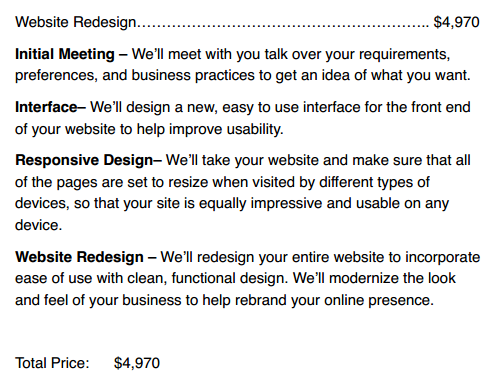
Notice how things are nice and easy to understand?
That’s the goal. A client should be able to flip to the page and have their cost question answered within seconds. Anything more complicated, and you risk losing their patience.
Depending on the length of the project, you might want to tie payments to specific milestones. Include this in a section called “Fee Schedule.”
Proposal Element Terminology
The purpose of the three key sections above is universal, but the terminology isn’t. Each element is referred to by multiple names.
- Problem Statement. Client Needs, Client Goals, Client Objectives, Goals and Objectives
- Recommended Solution. Recommended Solution, Recommended Strategy
- Pricing information. Fee Summary, Fee Schedule, Project Pricing
You can pick whichever options you like best in your proposals, as long as clients are able to glance at the element and quickly grasp its purpose.
Developing a Repeatable Process

Image credit: sarangib
Now that you understand the elements found in persuasive proposals, you can save time and trouble by streamlining your proposals into a repeatable process.
A repeatable process helps you save time instead of starting every new proposal from scratch. But it also leaves room for personalization to fit the specific project at hand. Adopting a process frees up time for you to pursue other crucial tasks, like creating recurring revenue streams.
The best way to create a repeatable proposal process is to use proposal software. Not only do you get the persuasive structure you need without a lot of manual steps. You also get an eye-catching presentation and other cool features, like electronic signatures and customizable client landing pages.
Another option is to create your own proposal templates. I’ll walk you through creating a couple of templates right now.
Start by classifying each temple by proposal size: large and small.
This makes it easy to know when to use which proposal. A little project, like a three-page website, gets the small proposal template. It’s tempting to try to get away with just a simple estimate on these kind of jobs. But your efforts will pay off if your pricing information includes an element of persuasion.
Small Proposal Outline
- Client Needs
- Recommended Solution
- Fee Summary
- Next Steps
This will come out to around a two-page proposal. Notice how all the three key elements we discussed above (problem statement, proposed solution, and pricing information) are included.
I also included a section called “Next Steps.” The purpose is to give someone who’s interested in moving the project forward an easy way to do so. What is the one key step a client should take right after reading to get the ball rolling? Now’s the chance to include that information.
A good next steps section might look something like this:
To get started with the redesign, ABC Company should:
1. Call us at (xxx-xxx-xxxx) to accept the proposal as-is or discuss desired changes
2. Finalize and sign the contract.
Once the contract has been finalized, we’ll reach out to ABC Company to set up a meeting to discuss timelines and the desired look and feel of your new website.
How many times have you thought about doing something, but put it off and forgot about it because you didn’t have a clear next step? Don’t let this happen! Give interested clients a simple way to move forward, and more of them will hire you.
If you’re looking for a sample contract to see how the “legalese” might look, feel free to check out this simple web design contract.
Large Proposal Outline
- Goals and Objectives
- Recommended Solution
- Fee Summary
- Fee Schedule
- Estimated Project Schedule
- Next Steps
- Terms and Conditions
The large proposal template looks more complicated than the small version. But it really shouldn’t run that much longer. Our research of over 25,000 client proposals found that proposals less than 5 pages long were 51 percent more likely to win than those that ran longer.
The key additions here are timeframe and legal information. It’s a good idea to break down large projects into phases or chunks to help clients envision which work will happen when. Naturally, both parties will want to protect themselves legally when a good deal of money is involved.
Finishing Touches

Image credit: insspirito
Now that you have your two templates with outlines in place, consider adding a little style to make your proposals really pop.
Create an elegant design (easier said than done) and use it as a header and footer in your Word template. Keep your design elements to a minimum. You want to use them tastefully, hinting at your creative ability without overpowering your content.
You can save even more time by adding some help text to your proposal outlines. This text will remind you what to write about in each section. If you’d like, you can even copy and paste some of the instructions in this article. Just remember it’s a placeholder, not real content.
Be wary about paragraphs of “recyclable text” that you find yourself including in every proposal. This stuff is too generic to be useful. Every project is different, so any content that you can reuse like that is garbage in the eyes of the client.
Remember, clients are only concerned with their own project and how you might be able to help them!
If you want to include a Company Information page or a Clients section, feel free to do so as long as it comes after your pricing information. You want to structure the information in the most persuasive manner possible. Keeping things about yourself (or your company) last gives clients the option to read it if they want to – without forcing them.
Tools and Resources
Like I mentioned earlier, you’ll get the highest return of your time by using proposal software like Bidsketch. This is the best bang for your buck because you get a professional look and a persuasive structure. You don’t have to worry about time-consuming details, like adding in simple page breaks within a PDF, because the features take care of those things. Proposal software also streamlines your workflow by integrating seamlessly with software like FreshBooks.
If you have to use handmade templates, follow the instructions above to create your own and be sure to include all the key elements.
Finally, web design and marketing services often go hand in hand. After all, a great website still won’t be found without adequate marketing. If you also help clients get more customers, be sure to check out or marketing proposal template.
Any Questions?
Submitting proposals – and not just sloppy ones, but good ones that grab attention and win bids – can seem daunting. But it doesn’t have to be. With an understanding of the basic persuasive structure and software (or templates) that make creating them repeatable, you’ll save time and land more clients.
It’s time to stop wasting precious time and racking up unpaid invoices with low-end clients. It’s time to attract the clients, projects, and rates you deserve. Great proposals will help!
Do you have any other questions about what it takes to create and submit compelling web design proposals? If so, leave a comment below. I’d love to hear from you!